Paying monthly utility bills is a regular part of managing household and personal expenses. Electricity bills, water bills, gas bills, broadband charges, mobile postpaid bills, DTH payments, and other recurring payments need to be cleared on time. Missing due dates can lead to late fees, service interruptions, or unnecessary follow-ups with service providers.
Digital payments have made this process easier. Users can now pay utility bills online through banking apps, payment apps, biller websites, UPI platforms, wallets, and other digital services. This helps save time and allows users to complete payments without visiting physical counters.
However, online bill payment should be done carefully. Users need to check biller details, consumer numbers, payment amounts, due dates, transaction status, and receipts. This article explains how online utility bill payments work, their benefits, safety checks, common mistakes, and practical tips for smoother payment management.
What Does It Mean To Pay Utility Bills Online
To pay utility bills online means completing bill payments through a digital platform instead of paying through cash or at a physical office. Users can pay bills using a mobile app, banking website, UPI app, card, wallet, or official service provider portal.
The process usually involves selecting the bill category, entering customer details, verifying the bill amount, choosing a payment method, and confirming the transaction. After payment, users generally receive a confirmation message, receipt, or transaction ID.
Online utility bill payment is commonly used for electricity, water, gas, broadband, DTH, mobile postpaid, landline, insurance, municipal taxes, and other recurring services.
Why Online Utility Bill Payment Is Useful
Online utility bill payment is useful because it reduces the effort needed to manage recurring expenses. Users do not need to travel, stand in queues, or depend on office working hours. Payments can usually be made at any time from a phone or computer.
Another benefit is better payment tracking. Most platforms store transaction history, making it easy to check previous payments, bill amounts, and payment dates. This helps users manage monthly budgets and avoid confusion.
Digital payment platforms may also send due date reminders. These reminders can help users avoid late fees and service disruptions.
Key Benefits Of Paying Utility Bills Online
Saves Time And Effort
Online bill payment can be completed within minutes. Users can pay from home, office, or while travelling. This is useful for people who manage several bills every month.
Helps Avoid Late Fees
Many apps allow users to save billers and set reminders. This reduces the chance of missing due dates and paying penalties.
Provides Payment Records
Digital receipts and transaction history help users maintain proper records. These records are useful during disputes or when checking monthly spending.
Supports Multiple Payment Methods
Users can pay through UPI, debit card, credit card, wallet, net banking, or other supported options depending on the platform.
Makes Budget Tracking Easier
When bills are paid online, users can review their monthly payment history and understand how much they spend on utilities.
How To Pay Utility Bills Online
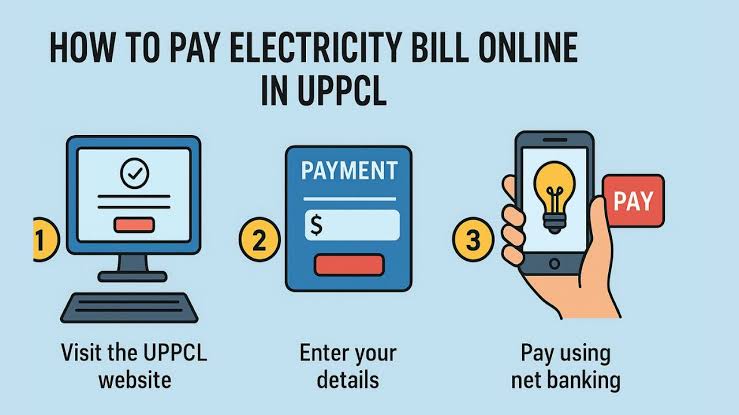
The steps may differ slightly depending on the platform, but the basic process is simple. First, open a trusted payment app, banking app, or official biller website. Select the bill category such as electricity, gas, water, broadband, or mobile postpaid.
Next, enter the consumer number, account ID, mobile number, or customer reference number. The platform may fetch the bill details automatically. Before paying, check the biller name, customer name, amount, and due date.
After verifying details, select a payment method and complete the transaction using OTP, UPI PIN, password, or biometric verification. Once the payment is successful, save the receipt or transaction ID until the biller updates the payment status.
Things To Check Before Making A Payment
Before paying any bill online, users should confirm that the biller name is correct. Selecting the wrong biller may lead to failed payments or refund delays.
The consumer number or account ID should also be checked carefully. A small mistake can result in payment being linked to the wrong account.
Users should also check the final payable amount. Some platforms may include convenience fees depending on the payment method. Reviewing the final amount before confirming payment can help avoid confusion.
Managing Monthly Bills With Better Planning
Online utility payments are more useful when users organize them properly. Instead of paying bills randomly, users can create a fixed monthly routine. For example, they can review all due bills at the beginning or middle of the month and pay them before the due date.
In the middle of monthly financial planning, users may also need to handle urgent expenses through options such as a gold loan if they own gold and need secured credit. However, borrowing should be considered only after checking interest rates, repayment terms, processing fees, and affordability.
Utility bill payments and borrowing decisions should both be managed carefully. Timely bill payments help avoid penalties, while responsible borrowing helps prevent repayment stress.
Safety Tips For Online Utility Bill Payments
Safety is important while making digital payments. Users should pay bills only through trusted apps, official biller websites, banking platforms, or recognized payment services. Unknown links received through SMS, email, or messaging apps should be avoided.
Do not share OTPs, UPI PINs, passwords, card CVV, or net banking credentials with anyone. Genuine platforms do not ask for these details through calls or messages.
It is also safer to avoid public Wi Fi while making payments. Use mobile data or a secure private network. Keep payment apps updated and enable transaction alerts for better tracking.
Common Mistakes To Avoid
Paying Without Checking The Biller
Always confirm the biller name before payment. Wrong biller selection can cause payment failure or delays.
Entering The Wrong Consumer Number
Incorrect customer details can result in the payment not being credited to your bill account.
Ignoring Failed Payment Status
If money is deducted but the bill is not paid, check transaction status before trying again. Repeating payment may lead to duplicate deductions.
Not Saving Receipts
Receipts and transaction IDs are useful when the biller does not update the payment immediately.
Clicking Unknown Payment Links
Fake bill payment links can be used for fraud. Always use official or trusted platforms.
What To Do If A Utility Bill Payment Fails
If a payment fails and money is not deducted, users can check details and try again. If money is deducted, they should wait for the platform to update the transaction status. Most platforms either process the payment later or refund the amount within the stated timeline.
Users should keep the transaction ID, payment screenshot, and receipt until the issue is resolved. If the bill still shows unpaid after the expected time, contact the platform support or service provider with payment details.
Avoid making repeated payments immediately after a failed transaction unless the platform clearly confirms failure and no deduction.
How To Choose A Reliable Payment Platform
A reliable platform should show accurate bill details, support major billers, offer secure payment methods, provide instant confirmation, and maintain transaction history. It should also provide customer support for failed payments, refunds, and bill status issues.
Users should also check whether the app is easy to use. Saved biller details, due date reminders, clear receipts, and quick complaint options can make bill management easier.
A good platform should not hide fees or make the payment process confusing. Transparency is important for safe and smooth bill payments.
Conclusion
Online utility bill payment helps users manage regular expenses with less effort. It allows payments for electricity, water, gas, broadband, mobile postpaid, DTH, and other services through digital platforms. This saves time, improves record keeping, and reduces the chances of missing due dates.
Before making payments, users should verify biller details, customer number, due date, payment amount, and transaction status. They should also follow basic safety practices such as avoiding unknown links, protecting OTPs, and using trusted platforms. With careful use, online utility bill payments can make monthly financial management easier and more organized.
FAQs
What Is The Safest Way To Pay Utility Bills Online
The safest way is to use official biller websites, banking apps, or trusted payment platforms with secure login and transaction alerts.
Which Bills Can Be Paid Online
Users can pay electricity, water, gas, broadband, mobile postpaid, DTH, insurance, landline, and other supported utility bills online.
What Should I Check Before Paying A Bill Online
Check the biller name, consumer number, customer name, bill amount, due date, payment method, and final payable amount.
What Happens If My Bill Payment Fails
If money is deducted, the payment may be processed later or refunded. Save the transaction ID and contact support if the issue continues.
Can Online Bill Payments Help With Budgeting
Yes, online payment history helps users track monthly utility expenses, compare past bills, and manage due dates more easily.
About the Author