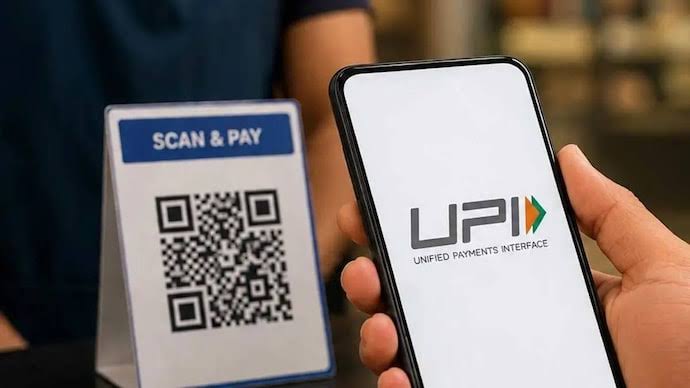
UPI has become a convenient way to pay for everyday purchases, transfer money, recharge mobile phones, and settle bills directly from a bank account. However, users may sometimes find that a transaction is declined even when sufficient funds are available.
One possible reason is a transaction limit. UPI payments are subject to limits that can vary according to the transaction type, bank, payment application, and applicable rules. Understanding these limits can help you plan larger payments, avoid unnecessary retries, and resolve payment issues more efficiently.
What Are UPI Transaction Limits?
UPI transaction limits determine how much money a user can send or pay through the system within a specified period. These limits help support payment security and manage transaction risk.
There is no single limit that applies to every UPI transaction. The permitted amount may depend on whether you are transferring money to another individual, paying a merchant, or completing a payment in a category with specific limits.
Your bank may also apply its own restrictions within the limits permitted by the wider UPI framework. As a result, two users may have different transaction experiences even when they use the same payment application.
Understand The Different Types Of Limits
Before making a payment, it helps to distinguish between the main types of restrictions.
1. Per-Transaction Limit
This is the maximum amount permitted for a single transaction. If your payment exceeds the applicable limit, it may be declined even if your account balance is sufficient.
For example, a user trying to transfer a large amount in one transaction may need to check whether the bank and payment category permit that value.
2. Daily Transaction Limit
Some banks or payment services restrict the total amount that can be transferred within a day. There may also be restrictions on the number of transactions.
Reaching a daily limit can prevent additional payments until the applicable limit resets. The reset time and counting method may depend on the bank or service.
3. Category-Specific Limits
Certain payment categories may have higher permitted limits under applicable UPI rules. These can include specified payments related to areas such as healthcare, education, tax payments, and other designated merchant categories.
Higher limits are not automatically available for every transaction. The merchant, bank, application, and transaction purpose must meet the relevant requirements.
Why UPI Limits Can Differ
Several factors can affect the amount you are allowed to transfer.
| Factor | How it may affect a transaction |
| Bank policy | The bank may set limits within applicable system rules |
| Transaction type | Person-to-person and merchant payments may have different restrictions |
| Merchant category | Eligible categories may have specific limits |
| Payment history | Banks may apply risk checks or temporary restrictions |
| New account or device | Additional security controls may apply |
| Transaction frequency | Repeated payments may trigger risk checks or restrictions |
A declined transaction does not always mean you have reached a monetary limit. Incorrect details, technical issues, bank downtime, insufficient balance, or security checks can also prevent a payment.
How To Check Your UPI Transaction Limit
The most reliable approach is to check the information provided by your bank and payment service rather than relying on a general figure found online.
If you use a recharge app for mobile recharges or other supported services, check its payment instructions and transaction information. Remember that the application’s payment options may differ from the limits set by your bank.
To confirm your available limit:
- Open your bank’s official application or website.
- Review the UPI or digital-payment information.
- Check whether the limit applies per transaction, per day, or by transaction count.
- Review any category-specific requirements relevant to your payment.
- Contact your bank if the published information does not explain a declined transaction.
Your payment application may show useful transaction details, but the bank or relevant payment provider may need to confirm the exact restriction.
What Happens When You Reach A UPI Limit?
When you reach an applicable transaction limit, a new payment may be declined. The exact message depends on the application and bank.
For instance, you might be unable to send another transfer after completing several payments earlier in the day. Alternatively, one large transaction might exceed the permitted amount even if you have not made any other payments.
If this happens, avoid repeatedly attempting the same transaction without understanding the reason. Check the displayed error message, review your recent payments, and confirm the limit with your bank.
If the payment is urgent, ask the recipient which other authorised payment methods they accept. Any alternative should be suitable for the transaction and verified before use.
How UPI Limits Affect Everyday Payments
Transaction limits can matter for several common activities, including paying bills, shopping, transferring money, and managing household expenses.
For example, a user making a routine upi payment for groceries may not encounter any difficulty. However, a large bill or a transfer that falls under a different payment category may be subject to a separate limit.
To manage everyday payments more smoothly:
- Check the permitted amount before making a large transfer.
- Keep sufficient funds in the linked bank account.
- Verify the recipient and amount before confirming.
- Plan important payments ahead of their due dates.
- Keep transaction references for payments that fail or remain pending.
For recurring expenses, it can be helpful to maintain a list of payment dates and expected amounts. This makes it easier to identify which transactions need advance checking.
Can You Increase Your UPI Transaction Limit?
You may be able to request a review or change where your bank provides that option, but an increase is not guaranteed. Limits are governed by applicable system rules, bank policies, and transaction-specific requirements.
Start by contacting your bank through its official support channel. Ask whether your current restriction is a bank-set limit, a system-level limit, a transaction-category restriction, or a temporary security measure.
Do not trust individuals or websites that claim they can bypass UPI limits in exchange for a fee. Avoid sharing your PIN, OTP, or banking credentials with anyone offering to increase your limit.
If a payment exceeds the applicable limit, discuss an authorised alternative with your bank or payment provider.
Safety Tips For Transactions Near The Limit
Larger payments deserve additional attention because a mistake can have a greater financial impact.
Before confirming a transaction, verify the recipient’s name, check the amount carefully, and confirm that the payment is intended for that recipient. Never enter your UPI PIN merely to receive money or claim a refund.
If money is deducted but the payment status is unclear, check your bank statement and the transaction history before attempting another payment. Save the transaction reference and follow the bank’s dispute process if necessary.
Use official support channels to resolve payment problems instead of relying on unsolicited calls or messages.
Conclusion
UPI transaction limits help determine how much users can transfer or pay through different types of transactions. The applicable limit may depend on the bank, payment category, transaction amount, and security checks.
Before making a large or time-sensitive payment, confirm the current rules with your bank and payment provider. Understanding the difference between per-transaction and daily limits can help you plan payments, avoid repeated declines, and use UPI more confidently.
FAQs
1. Are UPI transaction limits the same for every bank?
No. Applicable system rules, bank policies, transaction types, and payment categories can affect the permitted amount.
2. Can I make multiple UPI payments in one day?
Yes, subject to the applicable transaction-count and monetary limits set by the relevant bank and payment system.
3. Why was my UPI payment declined despite having enough money?
Possible reasons include reaching a limit, bank downtime, incorrect details, security checks, or technical issues. Check the error message and contact your bank if needed.
4. Can I increase my UPI transaction limit?
That depends on your bank’s policies and applicable rules. Contact your bank to check whether a change is available.
5. Do mobile recharges and bank transfers have the same UPI limit?
Not necessarily. The applicable restrictions may differ according to the transaction type, payment provider, bank, and relevant category rules.
About the Author